Most people are still using AI like a smarter search bar.
I wanted something very different. I wanted an assistant that could wake up with context, know what mattered, understand my business, remember my preferences, speak in a real voice, control things in the physical world, and actually help me get leverage across work, home, and business.
That assistant is Alice. She runs on OpenClaw.
This is the full story of how I built her, what she actually does across every area of my life, what broke along the way, and why I think personalized AI assistants are going to become one of the most important software categories of the next decade.
7 weeks
To build
45 days
In production
15
Integrated services
30+
Specialized skills
Pick a life area
- Slack
- Gmail
- Calendar
- Asana
- Home Assistant
- ElevenLabs
- Telegram
- Notion
- n8n
- Grocery API
The moment I stopped chatting and started building
The problem with most AI tools is not intelligence. It's lack of context.
Every session starts from scratch. Every prompt requires re-explaining who I am, what I'm working on, what matters, what my tone is, what tools I have access to, and what happened yesterday.
That is not an assistant. That is a very clever intern with amnesia.
I wanted something closer to a real chief-of-staff crossed with an operator. Something that reads the right context before every conversation, remembers important details about my life and businesses, shows up wherever I already communicate, controls digital tools and physical systems, speaks with a voice, and takes action instead of just answering questions.
OpenClaw gave me the framework to do that. The rest of this post is organized around the areas of my life where Alice is doing real work, and then the technical architecture underneath her that makes any of it possible.
Part one: what Alice helps me run
Health: the Saturday meal prep automation
If I had to pick one automation to show someone who doesn't believe AI is useful yet, it would be the Saturday meal prep run. It ties together almost everything Alice knows about me, and it saves me hours every single week.
Here's what happens.
Every Saturday evening, a cron job inside Alice wakes up and starts planning next week's food. She already knows what she needs to. She knows the foods I like and the ones I won't touch, pulled straight out of long-term memory. She knows I'm trying to lose weight and lower my blood pressure, so she pulls in the dietary rules that come with both of those goals: lower sodium, more fibre, lean protein, the usual DASH-aligned stuff. She knows the macro targets I'm shooting for across a seven-day window. And she knows the budget, which is a flat $100 a week for groceries.
From all of that, Alice builds a seven-day meal plan that hits the calorie and protein targets, stays inside the budget, keeps variety across the week so I'm not eating the same thing twice, and avoids anything on my "do not buy" list. Then she does the part that still feels slightly illegal. She translates the plan into an actual shopping list and pushes it straight into my local grocery store's cart using a reverse-engineered version of their API. Items, quantities, substitutions, all of it, ready to check out.
At the end, I get a message on Saturday night that basically says, "Here's the plan for next week, here's the cart I built, check it and hit buy if you're happy." I review it, tap confirm, and Sunday's groceries arrive already sorted against a real meal plan.
Saturday meal prep flow
Cron fires
Saturday scheduler wakes Alice
Read context
Diet rules, likes, dislikes, weight + BP goals
Generate 7-day meals
Inside $100 budget, hitting calorie + protein targets
Query grocery store
Reverse-engineered local store API
Build shopping cart
Items + quantities + substitutions, ready to buy
Slack review message
'Here's the plan. Hit buy if you're happy.'
55 items, around $211 in the earlier big run, now tuned to about $100 a week. Ordered in seconds.
The compounding effect of this is the part I didn't see coming. I don't wander into a grocery store without a plan anymore. I don't order takeout because I "didn't have anything in." I already know what I'm eating on Wednesday because Alice built it, and the ingredients are in the fridge because she ordered them. The weight loss and the blood pressure goals stop being willpower problems and start being defaults.
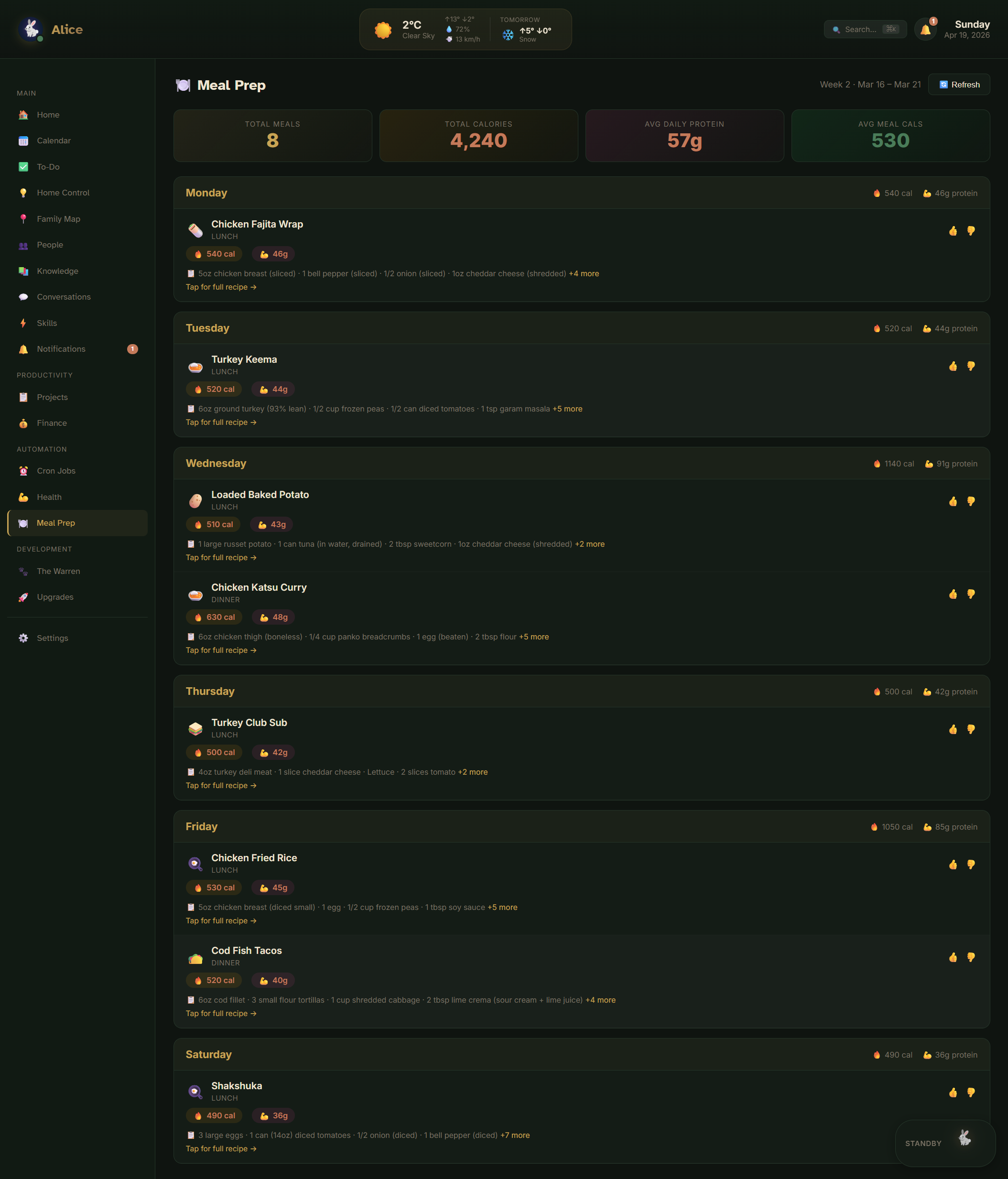
This one automation is a good microcosm of the whole system. Memory (my preferences and goals), tools (the reverse-engineered grocery API), cron jobs (the Saturday scheduler), and messaging (the Saturday-night review ping) all working together. None of it is impressive on its own. The combination is the point.
Home: Home Assistant as Alice's hands
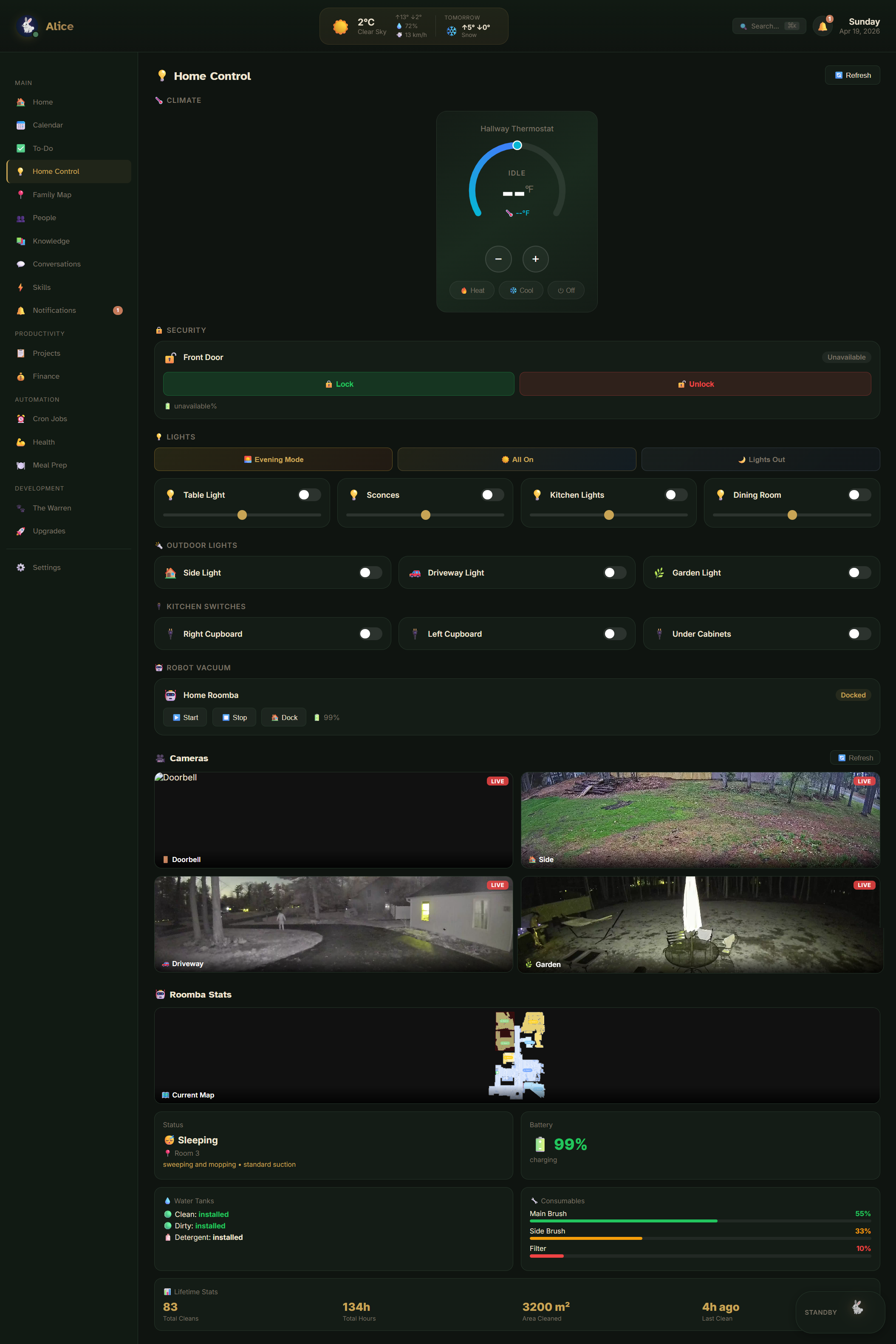
At home, Alice interacts with every piece of connected equipment I own. She turns off the lights when I go to bed, plays music through the speaker system on request, adjusts the thermostat based on the forecast and the time of day, flags camera notifications when something important happens at the front door, runs the robot vacuum on its daily schedule and handles the mop routine overnight, monitors the doorbell for deliveries, switches the exterior lights on at dusk, and shifts between presence-based scenes so the right rooms light up when someone actually walks into them.
The hardware is pretty ordinary: Kasa kitchen and cabinet lights, Google speakers spread across the house, a Nest Hub style display in the bedroom, a smart thermostat, the robot vacuum, and outdoor lighting. Nothing exotic. The interesting part is the orchestration layer on top.
The real value is not flipping a light on and off. The value is context-aware orchestration. Alice understands which Home Assistant instance is the default, which one belongs to the salon, which devices are safe to trigger casually and which should never be touched without an explicit confirmation, how announcements should route through speaker groups, and when to use a quiet voice response to me versus a whole-home announcement. Once you connect AI to real-world systems, sloppy context stops being funny very quickly. A bad automation in a chat window is embarrassing. A bad automation that unlocks a door at 3 a.m. is a problem.
Family: one calendar instead of five
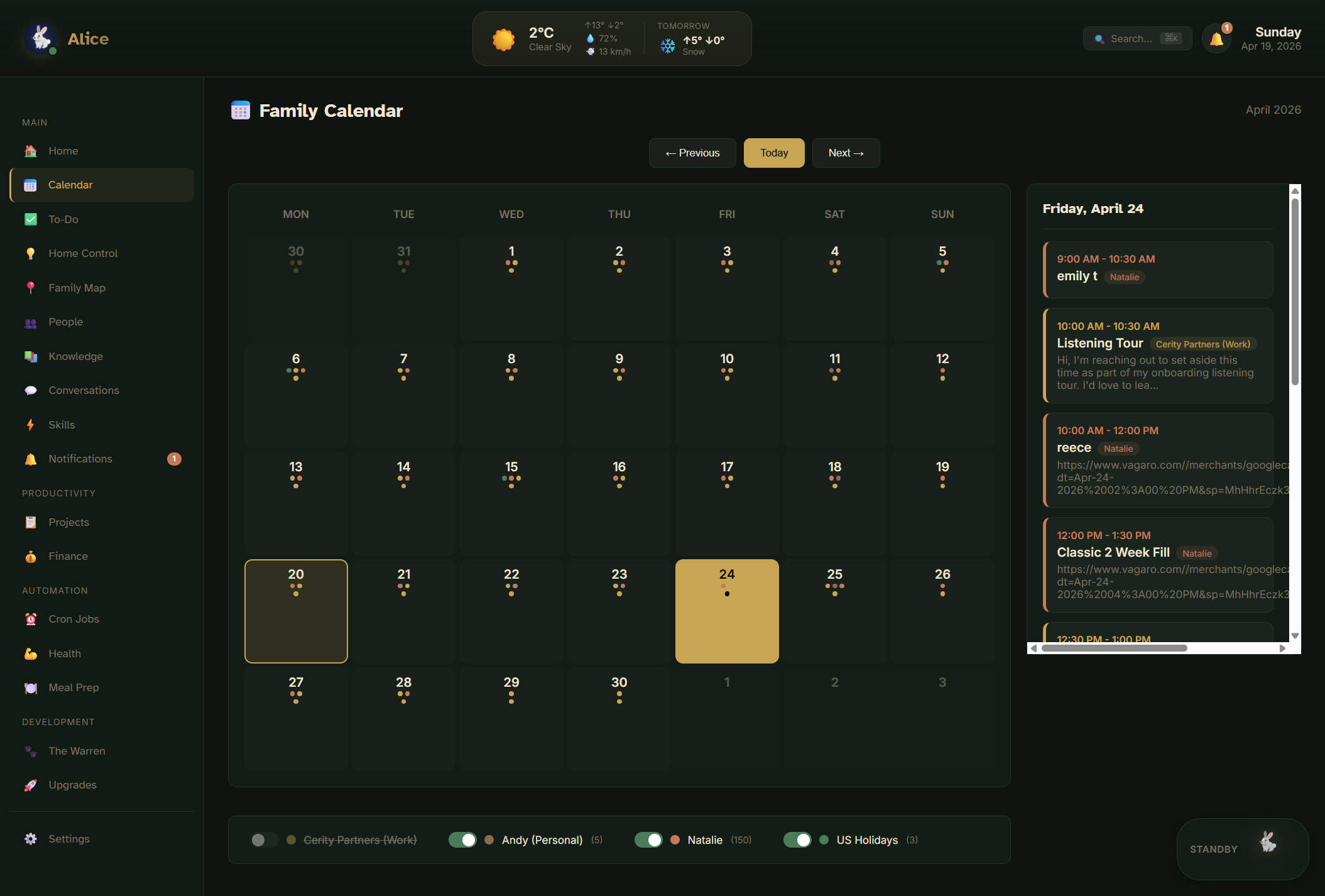
One of the smallest looking features of Alice HQ has quietly become one of the most useful. The family calendar.
It merges my personal calendar, Natalie's calendar, Cody's work schedule, and the relevant US holidays into a single view with per-person colour coding I can toggle on and off. No more flipping between three calendar apps to figure out who's free on a given Tuesday. Alice can read across all of them, so when I ask "can Natalie do dinner with the family on Friday," she answers in one shot.
Birthdays get their own module on the dashboard so nothing sneaks up. Upcoming birthdays are surfaced a week out, with a note on what I've given in previous years pulled from memory, so I can act early instead of scrambling. The shopping list is shared too, so anyone in the house can add something to it and Alice picks it up in the next grocery run.
Career and work: the salon, the skills library, the content engine
On the work side, Alice helps me run three overlapping things: The Ivy salon business, a growing library of AI-assisted workflows I use for client work and my own brand, and the content engine that documents both.
The Ivy itself is a salon suite business built on a rent-to-rent model. Independent beauty professionals rent space, run their own books, keep their own income, and set their own hours. I built the business around systems thinking from day one, and Alice now sits on top of the whole operation. The recruitment funnel runs on an automated booking flow that lets prospective renters tour the space without me being there. Billing runs through a custom Salon Manager integration that invoices, collects, and reconciles automatically. Renter feedback loops and training content run through the same stack, so when someone new comes on board, they get a consistent onboarding experience without me in the middle. Document and compliance storage is centralized, which means every renter's license and insurance certificate is one click away when we need it. Home Assistant handles the physical operations at the salon, including smart cleaning routines at close, environmental control through the day, access logging, and a handful of marketing-support automations that post to the shared social accounts on schedule. The website, including the renter pages, gets pushed through the same assistant layer. I'm not talking about theoretical AI productivity gains. I'm talking about a real physical business that can run with less friction because the systems are doing the repetitive work.
On top of the operational side sits the skills library. A skill is not a prompt. A skill is a structured methodology with research steps, templates, decision criteria, and evaluation checkpoints built in. When I ask Alice to do an SEO audit, she doesn't improvise. She runs the SEO Audit skill, which walks through the same checklist I would walk through, with the same tools I'd use, at the same level of rigor. The same is true for copywriting, cold email sequencing, ad creative generation, A/B testing, YouTube scripts, and plenty more. The skill library is how I lock in the quality bar. Instead of asking an AI to "help me write an ad" and hoping for the best, I ask her to run the Ad Creative skill, and I get an output that's been shaped by the same framework I'd use if I had a whole afternoon.
And on top of the skills layer sits the content engine. Alice can generate scripts for videos, structure long-form ideas into chapters, work with production notes across a project, pipe into Remotion for animation and rendered video production, and drive AI-generated visuals and voiceover pipelines when I need assets at scale. That part matters because once an assistant has memory and context, it can do much better creative work than a generic AI prompt. It understands the tone, the story, the audience, the business model, and the real examples available in my library. In practice, Alice became both the thing I was building and one of the tools helping me tell the story of building it. The YouTube videos on giving AI access to my life, on automating the salon, and on using AI as a real operating layer were all produced with Alice in the loop.
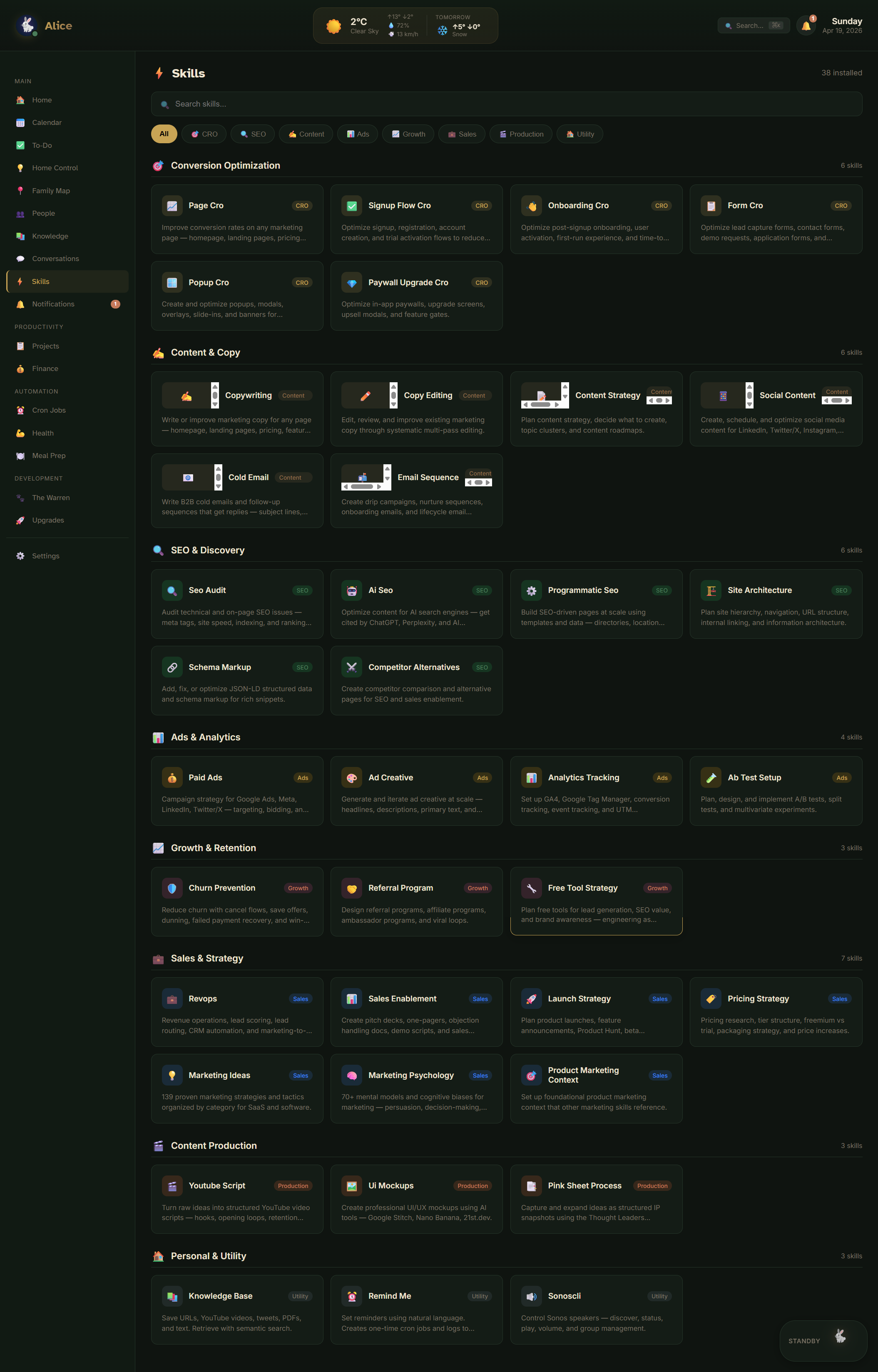
Cross-venture project tracking ties it all together. Kitchen renovations, website builds, business expansion, and new Ivy markets all live in a shared task layer that Alice coordinates against. When I'm working with a human VA through Slack, she's the glue: surfacing what's ready to be done, where it's blocked, and what I should look at next.
Finances: billing, budgets, and the salon economy
The money side of Alice is quieter but it's what keeps everything honest.
At the salon, the billing stack runs entirely through automated rails. Renters are invoiced on schedule, payments get collected and reconciled, and Salon Manager is the system of record for anything cash-related. That means I don't spend my evenings matching transactions to invoices, and I don't have to worry about whether an invoice went out this month. It did. Alice knows, and the dashboard shows me if anything failed.
On the personal side, the $100 weekly grocery budget is the most visible constraint because the meal prep automation has to plan inside it. But the same pattern shows up in smaller places: subscription reviews, recurring charge checks, and cross-venture expense flags that keep me from bleeding money quietly.
The pattern here matters more than any specific integration. When money flows through clear rails and an assistant watches them, there's a lot less cognitive overhead sitting in the back of your head all the time wondering whether you remembered something.
Personal growth: memory as an operating system
The least obvious area is maybe the most important. Personal growth, for me, is mostly about paying attention to the signals I'd otherwise forget.
Alice's long-term memory holds the stable stuff about me: my goals, my standing rules, the people who matter, the promises I made to myself. Her daily memory captures what happened today, what changed, what I said I'd do next, and what broke. When she wakes up every session, she loads both. The effect is that she's always reading my life back to me with enough context to notice when something has drifted.
If I said I was going to walk every day and I haven't for a week, she knows. If I said I wanted to be in bed by 11 and I've been closer to 1 a.m. for three days straight, she notices. If I told her my goal for this quarter and my actions don't match it, she's one of the only places where both pieces of information exist side by side.
Most productivity tools fail at this because they either remember nothing or remember everything. Alice remembers the right things in the right places. That split is what turns memory from a storage problem into an operating system for my life.
Part two: how she actually works
A real identity, not a prompt
One of the first things I did was stop thinking about Alice like a model and start thinking about her like a person with a role.
Alice got a name, a tone, a set of communication rules, a library of memory files, operating instructions, task boundaries, explicit tool access, and channel-specific behavior so she sounds different in a Slack DM than in an automated email summary. That matters more than people think.
A useful AI assistant is not just the model I choose. It is the system around that model: identity, memory, tools, routing, guardrails, workspace, and context discipline. The prompt is the tiniest slice of the whole thing.
In my setup, Alice reads from a structured workspace every time she wakes up:
AGENTS.md          # the roster and how they route work
SOUL.md            # identity, tone, operating principles
USER.md            # who I am, what I care about
TOOLS.md           # tools available and how to use them safely
MEMORY.md          # durable long-term memory
memory/
  2026-04-17.md    # yesterday's notes
  2026-04-18.md    # today's notes in progress
  2026-04-19.md    # tomorrow queued up
That gives the assistant continuity. Instead of me repeating myself every day, Alice wakes up, reads the workspace, and picks up where we left off.
Over time I added more agents to the roster. Alice is the chief-of-staff. Andria handles design and creative work. Felix handles code. Iris runs the salon workspace exclusively. Each agent has its own soul file, its own memory, its own tool access, and its own set of rules about what it can and cannot touch.
Alice
Chief of staffAndria
Design leadFelix
Dev leadIris
Salon operator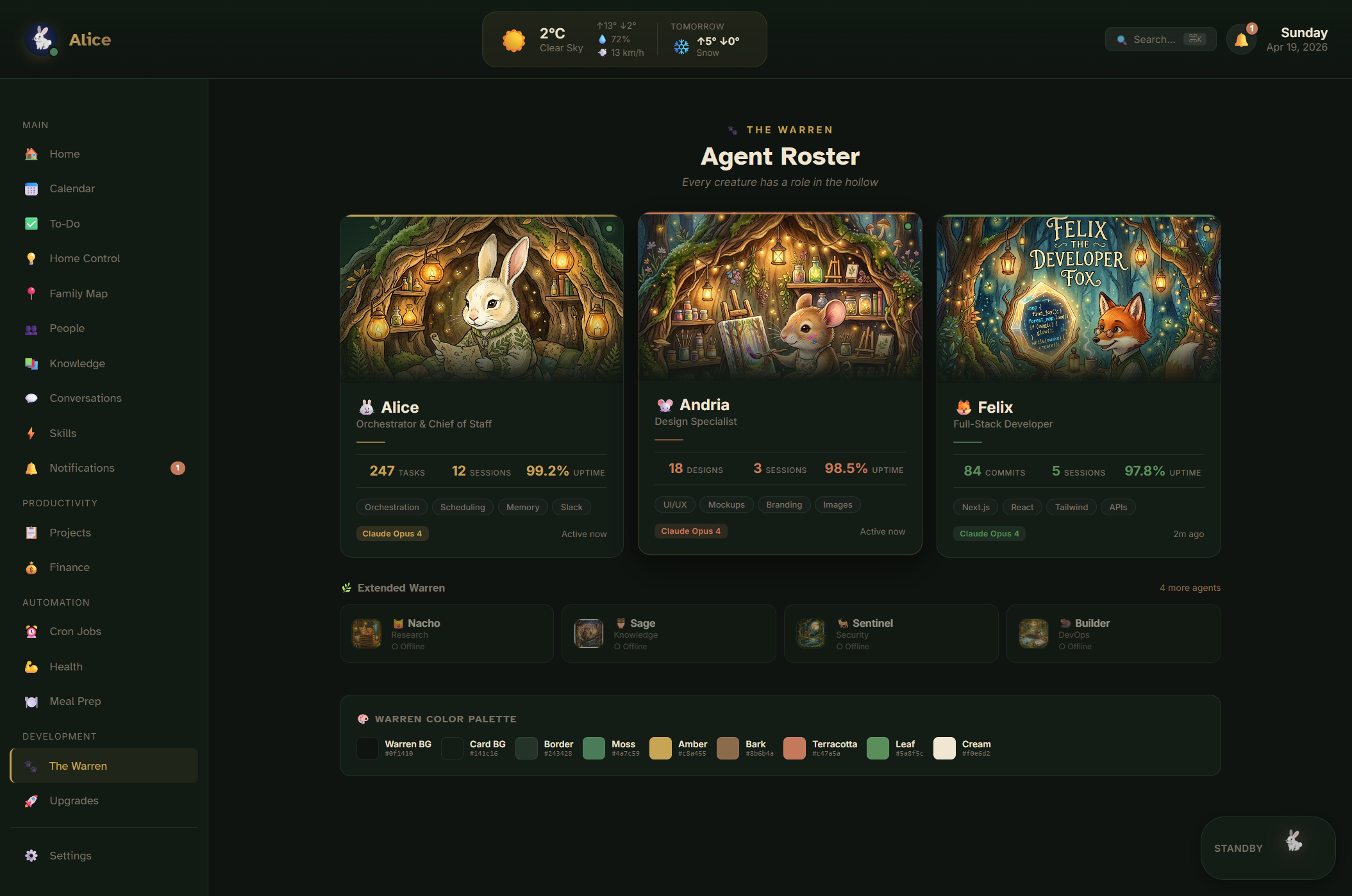
Two-tier memory that actually holds up
I gave Alice two kinds of memory, and the separation matters more than any clever retrieval trick.
Long-term memory is a short curated file. It holds durable truths about my life that don't change week to week. Who I am, how I work, my standing rules, my preferences, the important people in my life, and the major projects I'm committed to. The file is small on purpose. If it bloats, it stops being useful, because Alice can no longer rely on everything inside it being true.
Daily memory is a separate folder of dated notes. Each note captures what happened that day, what changed, what I said I'd do next, and what broke. Alice reads the most recent notes on wake and uses them to pick up context that is alive right now but would be noise in long-term memory.
Most AI tools fail because they either remember nothing or remember everything badly. I built a system where Alice remembers the right things in the right places. Long-term keeps her stable across months. Daily keeps her sharp across hours. That combination lets her carry forward project context across days without bloating every session, keep business context separate from family context, split different trust boundaries into different workspaces, and notice drift over time because yesterday's notes are always readable.
Channels: meeting myself where I already am
A real assistant cannot live in a browser tab. Nobody wants to open a dedicated app to ask their AI what time the plumber is arriving. So I connected Alice to the places where my work and communication already happen.
Slack is the main one. Alice lives inside Slack DMs and channels, which makes the experience much more natural than jumping into a separate AI app. I already coordinate work, personal tasks, family conversations, and business operations there. Slack is where my day actually flows.
From there I spun up more Slack-connected agents. My main Alice setup in one workspace. Andria, the design agent, in her own DM. Felix, the dev agent, also separate. And Iris, the Ivy-specific assistant profile, in the salon workspace with only access to salon tools, salon memory, and salon-authorized channels.
Getting multiple profiles running on the same machine taught me an important OpenClaw lesson: separate profiles need separate gateway ports. Once I split the main and Ivy profiles onto different ports, both could run cleanly with their own Slack connections and tokens without fighting over the same socket.
Because OpenClaw works across messaging surfaces, Alice doesn't have to answer me in only one place. She can coordinate across Telegram, summarize threads from Gmail, check calendars across accounts, and keep continuity across different communication loops without forcing everything into one channel.
Tools and skills, not just words
This is where OpenClaw gets interesting. The magic is not "AI that can talk." It is AI that can do things.
Alice has a tool layer underneath her. When she needs to read a file, she reads it. When she needs to update a page on the website, she edits it. When she needs to look something up on the internet, she runs a search. When she needs to look at tomorrow's schedule, she hits the calendar API. When she needs to delegate a longer task, she can spin up a sub-agent with its own scoped context and report back with the result. When she needs to reverse-engineer a grocery store API so she can build my cart for me, she does that too.
Because Alice can read, write, edit, research, delegate, run skills, and act on external systems, she can move from advice to action. Instead of telling me "you should probably update that page," she locates the file, edits the content, and reports back with the diff. Instead of saying "it might help to organize this," she rewrites the workspace files and splits oversized bootstrap files into cleaner reference structures. Instead of telling me how to build a second salon profile, she helps me structure the workspace, separate the memory, and connect it to Slack.
Once you cross that line, you stop using AI as an answer engine and start using it as an operator.
Voice, because voice changes everything
Text is useful. Voice makes it feel alive.
For high-quality output, I route Alice through ElevenLabs. That gave her a warm, consistent voice that matches the personality I wanted. Check-ins, morning briefs, and spoken summaries all feel more like a real assistant and less like a phone tree because the cadence and tone stay the same across every interaction.
For the house itself, I wired OpenClaw into a Home Assistant voice pipeline. A Voice PE satellite picks up the audio in each room, Whisper does speech-to-text, OpenClaw handles the reasoning and orchestration, and TTS reads the response back through the nearest speaker group. That created something much closer to a real home assistant than a static chatbot. I can ask Alice a question from the kitchen, she knows the context of the room I'm in, and she answers out loud without me ever touching a keyboard.
Then I started mapping the local AI server path: a local Whisper for STT, Piper for TTS, XTTS for voice cloning so Alice can speak in a lower-latency offline voice, Ollama for local models when a task doesn't need a frontier model, ComfyUI for image generation, and Open WebUI plus other local services for broader AI infrastructure. The point was not technical novelty. The point was latency, privacy, and ownership. A personalized assistant becomes dramatically more powerful when the response loop is short, the voice feels natural, and more of the stack can run on hardware I control.
Voice pipeline
“Hey Jarvis”
Wake phrase picked up by the Voice PE satellite in the room.
Home Assistant voice pipeline
HA routes audio to the configured STT provider.
Whisper API
Low-effort, high-accuracy transcription.
Local Whisper
Lower latency, fully private, no cloud round-trip.
OpenClaw + memory + tools
Alice loads the workspace, runs the skill, decides what to say and do.
ElevenLabs
Warm, consistent voice for check-ins and briefs.
Piper or XTTS
Offline voice cloning, minimal latency, no ongoing cost.
Speaker in the room
Spoken response routed back to the nearest speaker group.
Alice HQ, the control center
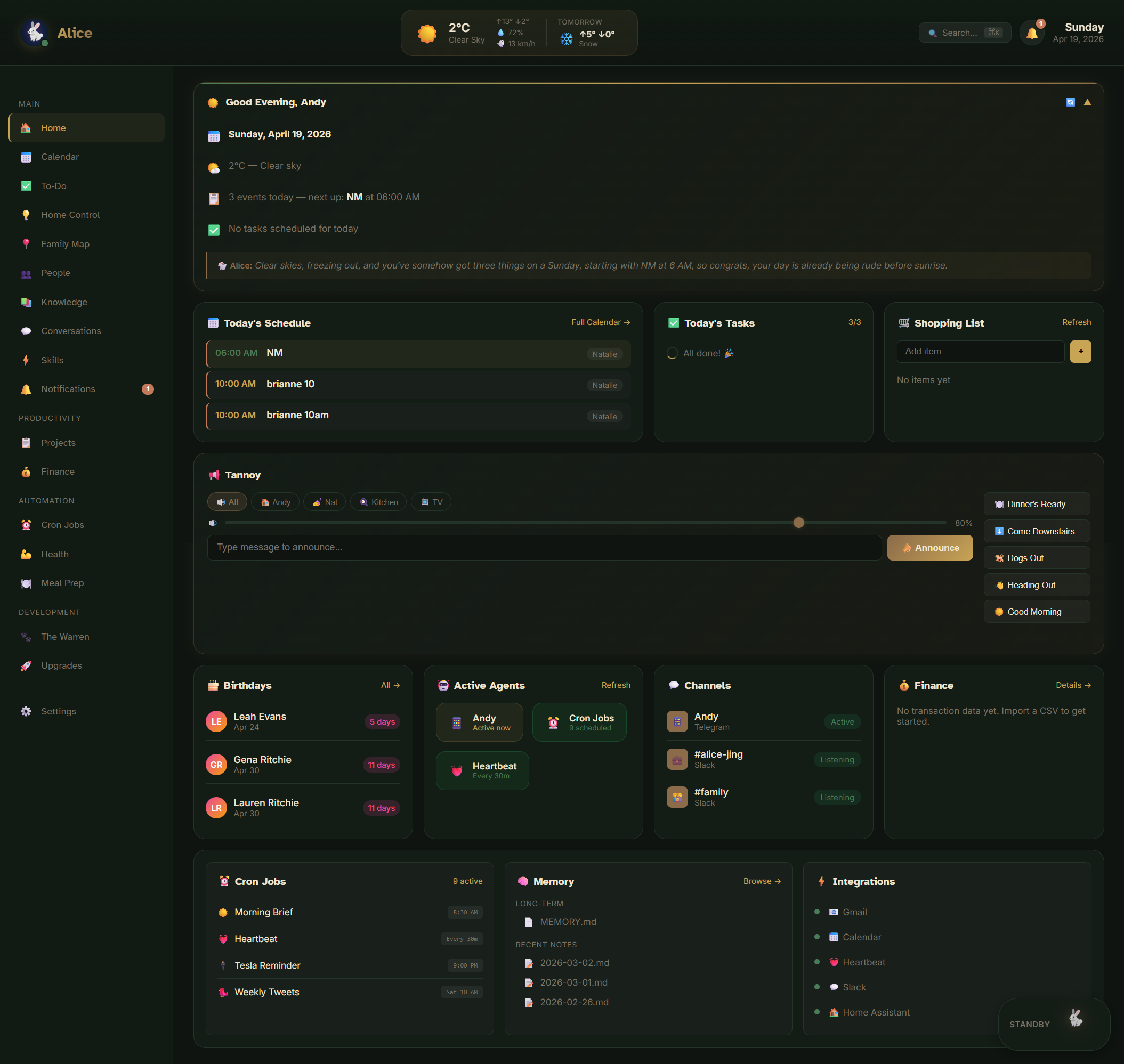
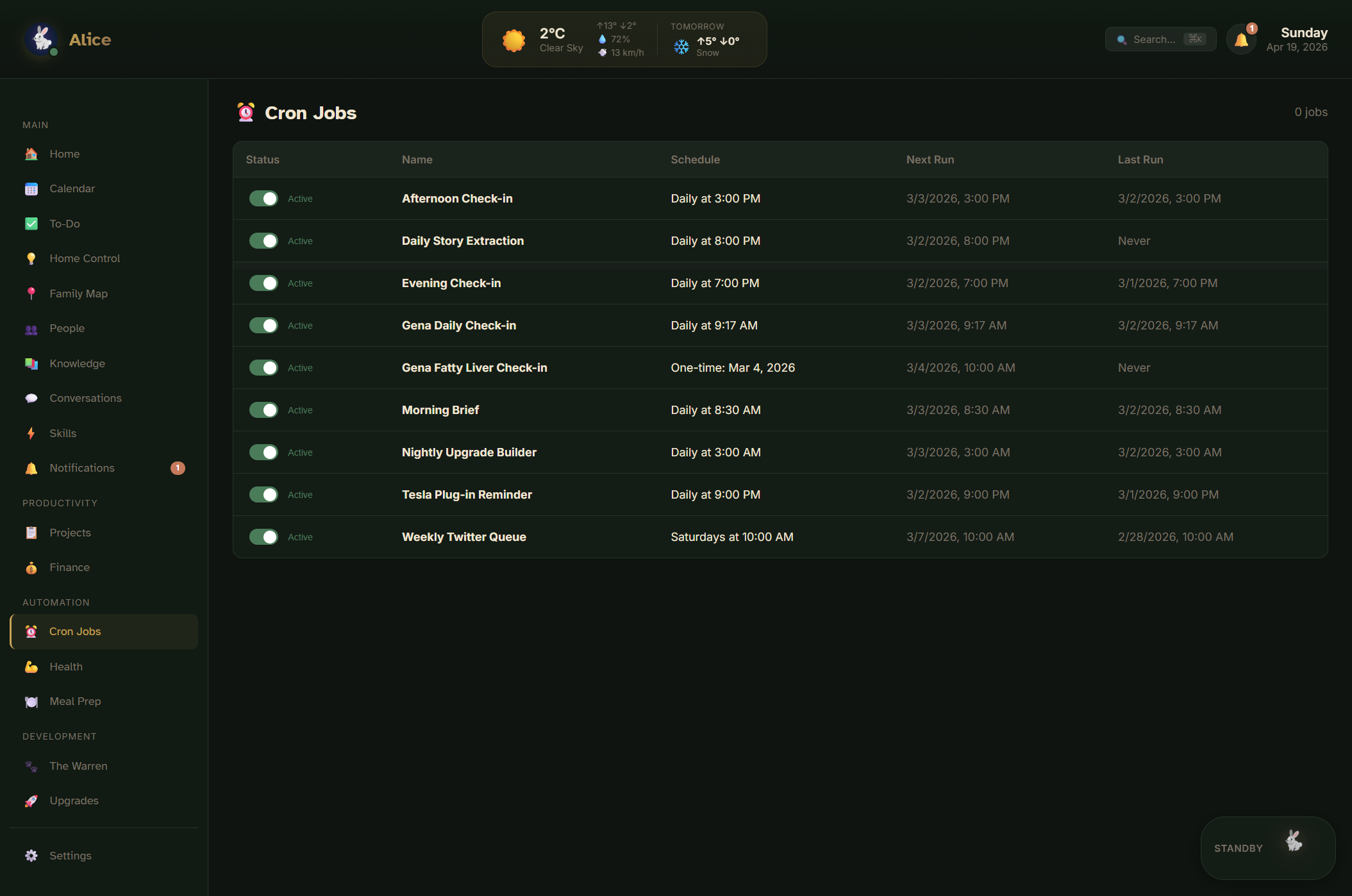
At some point, once the assistant has memory, tools, devices, tasks, and multiple integrations, chat alone stops being enough. I needed visibility, not just interaction. So I built the Home Dashboard, and it became Alice HQ, a real control center for the assistant and the system around her.
The dashboard surfaces system health at a glance. It lets me browse memory files directly so I can see what Alice knows and correct anything that drifted. It shows task and project context so I can see what's moving. It shows people context, birthdays, and relationship notes so nothing important gets forgotten. It tracks health data, macros, and hydration alongside meal plans. It lists every cron job with its next scheduled run, which became invaluable the first time one of them failed silently. It surfaces activity logs and notifications. It has a command palette for jumping around quickly, and a CRM-style conversations view that lets me see every open thread with every person, business, or agent.
A real assistant needs that kind of visibility. I need to know what it knows, what it did, what changed, what failed, and what is queued. The dashboard gave me that. And because it lives in the same ecosystem Alice lives in, it became part of the assistant itself, not a disconnected admin panel. Everything Alice can see, I can see. Everything I can change, Alice respects immediately.
Profiles for separate trust boundaries
This is one of the most practical lessons from the whole build.
At first it is tempting to put everything into one assistant. The more powerful the assistant gets, the more dangerous that becomes. A single-brain assistant that has access to personal messages, business finances, door locks, and the ability to publish content has a blast radius that would make me very nervous at 2 a.m.
So I started separating things properly. The main Alice profile lives in one workspace with personal, home, and broad operational context. The Ivy profile lives in a separate workspace with salon-only context. Each profile gets its own memory files, its own tool access, its own Slack account, and its own startup behavior, so when the Ivy profile wakes up, it sees only salon things, and when Alice wakes up, she sees only my things.
I also restructured the workspace itself to make bootstrap context smaller and safer. TOOLS.md was slimmed down and split into safe reference files that agents load on demand, not every session. MEMORY.md was reduced to a short durable summary so it doesn't balloon into a soup of stale facts. Secrets moved out of markdown and into environment variables, because a prompt file is not a place for API keys. Salon-specific docs were copied into the Ivy profile rather than being reused from the main workspace, because cross-workspace references were starting to blur the trust boundary I worked so hard to create.
Personalization is powerful, but separation is what keeps it usable.
Part three: the lessons
What broke, and what I learned
This project was not clean. That is part of why it is worth writing about.
I hit plenty of real-world issues along the way. Profile gateways collided on the same port the first time I ran two at once. Tokens got mismatched between profiles when I copied a config too aggressively. OpenClaw threw stale bootstrap warnings when markdown files grew too large. Secrets accidentally ended up in plain markdown docs during early iterations. Slack behaved differently between threads and 1:1 DMs in ways that broke routing until I chased them down. And every Slack app integration had the usual YAML and manifest nonsense that comes with permission scopes.
Those problems are not side stories. They are the actual work. Building a personalized AI assistant is not just a prompt engineering exercise. It is systems design. You have to think about identity, trust boundaries, tool permissions, runtime profiles, memory hygiene, secrets management, local versus cloud tradeoffs, channel routing, user experience, and observability all at the same time.
That is why OpenClaw has been such a good fit. It is not pretending the problem is just "which model should I use?" It gives you the primitives to build the rest of the system.
Why this matters more than most people realize
The big takeaway from all of this is simple.
The future is not one general AI chatbot that everyone uses the same way. The future is personalized assistants with memory, tools, identity, context, and access to the systems that matter in your actual life. Not just answering questions, but extending your operating capacity. An assistant that helps you run your home, run your business, coordinate your calendar, manage your projects, operate your smart devices, create content, support your family, and maintain continuity across everything you're working on.
That is what I built with OpenClaw. Alice is not finished. Iris is not finished. The local stack is still evolving. The voice side is still getting better. The dashboards will keep improving. The business automation will keep getting tighter.
But even now, this is already far beyond the generic "AI assistant" most people imagine. It is a personalized operating layer.
And once you experience that, it is very hard to go back.
If you want to build your own
If you are reading this and thinking, "I want that," the good news is you do not need to start by building everything at once. Start with the fundamentals.
Give the assistant a real identity and role. Not a persona prompt, a real one: name, tone, operating principles, boundaries. Write it down. Make it readable. Put it in a file that gets loaded every session.
Create a structured memory system next. Long-term for durable truths. Daily for context that is alive right now. Keep long-term small and daily honest. The separation is doing more work than the content.
Connect it to one or two channels you already use. Pick the places where your day already flows. Slack, Telegram, email, iMessage, whatever you live inside. Do not build a dedicated chat app for your assistant. Meet yourself where you already are.
Add read-heavy context before action-heavy tools. Let the assistant learn the shape of your life before you hand it the keys. Reading files, summarizing notes, drafting text, are all safe first moves. Sending messages and triggering physical devices should come later, with explicit guardrails.
Build a dashboard or control layer as the system grows. Once you have memory and automations and integrations, you need to see them. Visibility becomes a feature, not a luxury.
Split profiles when trust boundaries diverge. A salon should not share a brain with a family. A dev agent should not share a brain with a finance agent. Different profiles, different memory, different tools.
Keep secrets out of the assistant's default context. Environment variables exist for a reason. Prompt files are not a secure store.
Move slowly from reactive help to trusted automation. Start with "suggest." Graduate to "draft." Only then move to "do it." Each step earns the next.
That is what I did. And step by step, that is how I went from playing with AI to building a genuinely personalized virtual assistant that helps run a home, supports a salon, and acts like a real operational partner.
Not just AI that talks. AI that helps you build a life and business that can actually scale.
Want to build something similar for your life or business? Book a consultation.